
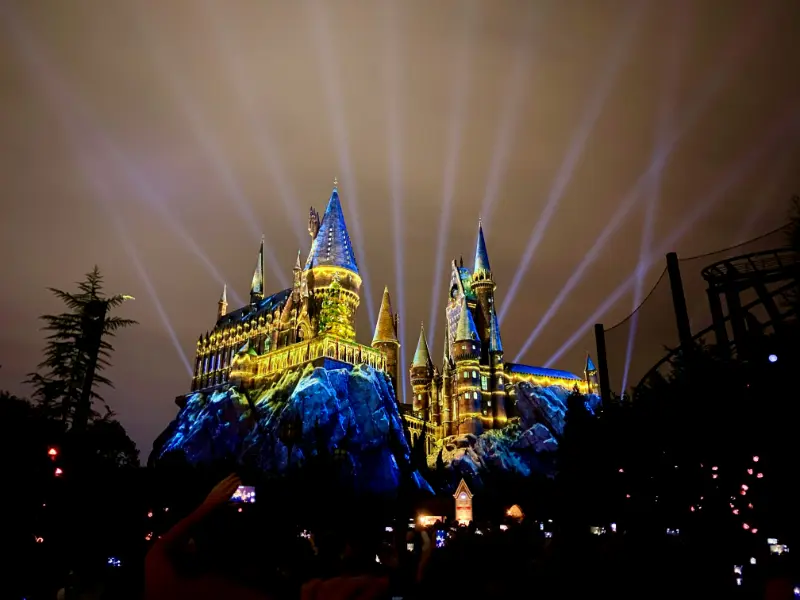
A Walt Disney World trip generates a remarkable number of pictures, yet buying the wrong photography package can be an expensive disappointment. Disney PhotoPass is a photography service; Memory Maker is a way of downloading eligible linked photos and videos. Understanding that difference matters before you pay. Families should also consider whether everybody likes posing for pictures, whether rides with automatic photographs are important, and how long the trip will last. This guide explains the choices without assuming a particular ticket or hotel package includes downloads. Terms, locations and prices can change, so check the official Disney pages at purchase.
At a glance
| Planning issue | Practical action |
|---|---|
| Product | Compare PhotoPass pictures and Memory Maker downloads |
| Sharing | Link eligible Family & Friends accounts |
| Attractions | Check photo linking requirements |
| After trip | Download before images expire |
Start with PhotoPass versus Memory Maker
PhotoPass photographers may take pictures at designated spots inside Walt Disney World, while selected attractions can capture images automatically. Having a photo taken does not necessarily mean its digital download is included with your admission. Memory Maker provides downloads of eligible linked PhotoPass media within its applicable period, subject to terms and conditions. If you only want an occasional picture, compare individual purchase options with the package. Some tickets or passes may have different photography benefits, so check exactly what your own reservation includes rather than relying on another visitor’s experience. Keep your own smartphone photographs as a useful alternative.
Understand the different purchase options
Disney offers Memory Maker products whose coverage can differ, including a one-day version and a multi-day option. The advance-purchase version has a waiting period that affects which photographs qualify, so buying it on arrival may defeat the intended saving. Read the start and end conditions for your specific product instead of assuming the first camera click begins coverage. The official Memory Maker page also explains how applicable images are associated with an account. If your family visits parks on only one day, a limited option might be sufficient; on several park days, a broader download entitlement may provide more value. Calculate the choice using your real itinerary.
Set up My Disney Experience in advance
Before leaving home, install My Disney Experience, sign in using the account associated with your booking and check the Family & Friends arrangements. Linking people after a busy day can be confusing when photographs are spread across accounts. Choose one responsible adult to check the images in the evening and confirm sharing permissions with other travelers. Do not share passwords among a large group. If members use their own Disney accounts, verify that everybody understands which pictures they choose to share. A linked account does not override other people’s privacy preferences. Save the purchase confirmation and retain your login recovery method while traveling.

Plan photo opportunities without chasing every camera
Popular themed locations change with shows, seasonal decorations and construction, so build flexibility into your photo plan. Use the app or ask Cast Members where PhotoPass photographers are working on the day. Plan one meaningful family photograph early while everyone is comfortable, then allow spontaneous images during the rest of the visit. Photographing sleepy children or exhausted grandparents in one more queue rarely produces happy memories. If a specific castle or character picture matters, leave time for a second attempt in better weather or light. Your favorite images may come from candid moments rather than every officially listed location.
How attraction photographs are connected
Some rides have photography or video features that rely on compatible linking technology and correct account settings. Do not assume that simply sitting on the ride guarantees a photograph will appear. Check Disney’s current requirements for MagicBand, MagicMobile or eligible devices, including Bluetooth permissions where relevant. If a ride image does not appear, gather the attraction name, approximate date and time, and the people seated together before requesting help. Avoid waiting until your flight home to investigate missing media. Visitors with no smartphone or incompatible equipment should ask Disney what alternative linking or assistance is available for the attraction involved.
Photos across a larger family group
Multigenerational trips can involve grandparents, parents, cousins and children visiting different parks on the same day. Disney’s sharing rules permit eligible linked Family & Friends media to be downloaded under a Memory Maker entitlement within specified limits. Confirm the current people limit rather than promising access for an unlimited reunion. Ask each person whether they want pictures shared with the designated organizer, especially when children or other guests are involved. Write down who holds the entitlement and who will download files. Groups should agree how photographs are stored privately after the holiday rather than automatically publishing every child’s image online.
Children, character meetings and consent
A photograph is optional; a frightened toddler should not be pushed toward a character for the sake of a purchased download package. Give children a choice between standing near a character, taking a family photo from a comfortable distance or skipping the moment. Adults who have sensory needs may also prefer quieter settings. Consider wheelchairs, mobility aids and standing fatigue when selecting a photographer location. Asking politely about an accessible position can make the process easier. Photograph your child with an identifying adult near the start of the day in case the group becomes separated, but do not treat PhotoPass as a safety or tracking service.

Weather, lighting and the best time of day
Florida’s midday sun can produce squinting, overheating and hurried pictures, while summer thunderstorms can interrupt outdoor photography unexpectedly. Try a short photo stop in the morning or near sunset, without promising that every popular area will be uncrowded. Take breaks inside or under shade when temperatures rise and never hold up an itinerary for perfect lighting. Nighttime castle and attraction photographs can be appealing, but they may require patience after a long day. Keep protective phone storage for heavy rain and check whether photographers are operating during storms. Being comfortable matters more than technical perfection.
Calculate value instead of assuming savings
For a short visit, estimate how many professional or attraction photographs your group truly wants to keep. Compare the official price of a relevant Memory Maker product with current individual photo costs and any existing pass or package benefit. A family keen on ride memories, character encounters and posed portraits may use the service heavily; a couple spending most time exploring attractions may not. Consider digital-only needs versus physical souvenirs and whether several relatives can lawfully use the same eligible entitlement. A price that feels justified for seven park days could be poor value for one afternoon. Never rely on an outdated price screenshot.
Remember the download deadline
Disney’s current Memory Maker guidance says PhotoPass photos and videos expire 45 days from when they were taken. Download eligible originals before they disappear rather than keeping them only in an online gallery. A sensible practice is to review and save your pictures several times during a longer holiday and again immediately after returning home. Download to more than one secure location, confirm files open correctly and preserve the highest resolution available. Organize albums by day or park so that family members can find their pictures later. Travel memories deserve a dependable backup, not just an app notification.
Solve missing or incorrectly linked photographs
If a picture is missing, first check the correct account, photo date and sharing settings. Make a note of the attraction, photo position, photographer area or approximate time. Disney can explain its current process for investigating missing images, but recovery is not guaranteed. Do not promise children that every ride will automatically produce a downloadable photo. Double-check camera visibility, privacy choices and the purchase window before contacting support. If family members disagree about where photographs should be stored, settle the sharing decision first. Keeping records of the purchase and trip dates makes any support request clearer and avoids needless repeated contacts.
Build a simple four-day photography plan
On the first day, get one relaxed group photograph and verify that it appears in the correct account. On the second, concentrate on attraction photographs that genuinely interest the group, checking the linking requirements beforehand. Use the third day for a character or scenic location without filling the schedule with photographer stops. On the fourth, check all accounts and identify outstanding missing images while you are still in Florida. This approach avoids paying attention to the app every hour. Even on a photo-focused holiday, carry water, take rest breaks and use your own camera when it is more convenient.
Frequently asked questions
Does PhotoPass mean all photographs are free to download?
No. Having pictures taken and owning downloadable copies are separate things. Check any included benefit on your exact ticket, package or pass, and compare official options before paying.
Is advance-purchase Memory Maker valid immediately?
Do not assume so. Disney specifies an advance-purchase waiting period affecting eligible photographs. Check the official product terms and purchase early enough for your first planned photo day.
Can grandparents and cousins share one purchase?
Eligible linked Family & Friends photographs can be covered within Disney’s conditions and participant limits. Confirm current sharing rules, and obtain each person’s permission before linking accounts.
What happens if an attraction photograph never appears?
Check the account and linking settings, then contact PhotoPass support with the ride name and approximate time. Recovery may depend on the attraction and available records.
When should I save photographs after the trip?
Download images promptly, ideally while traveling and once more after returning. Disney currently states that eligible PhotoPass photos generally expire 45 days after they are taken.
Official information to check before booking
Review the Disney Memory Maker terms, the My Disney Experience app guide and the Disney PhotoPass terms and conditions. These official sources matter because products, availability, linking rules and prices change. Use them to verify exactly what will be included on your visit, not simply what was available to another traveler last year. PhotoPass Terms.